SharePoint Exploitation in 2026: Patch, Hunt, and Harden
At 02:17, the reverse proxy recorded a short burst of unusual requests against an on-premises SharePoint farm. The farm had been patched during the previous maintenance cycle. The SOC initially closed the alert as internet noise. By 03:04, w3wp.exe had spawned a script interpreter on one web front end.
That sequence captures the operational problem behind the July 2026 SharePoint alerts: a “patched” farm is not necessarily a current farm, and a current farm is not necessarily a clean farm. SharePoint Server combines an internet-facing web application, high-value documents, application identities, IIS trust material, database access, and farm-wide administration. An exploit against the web tier can therefore become an identity and persistence incident rather than a one-host vulnerability ticket.
On July 14, 2026, CISA warned that threat actors were exploiting CVE-2026-56164, CVE-2026-56671, and CVE-2026-56673 against on-premises SharePoint deployments. The same alert highlighted CVE-2026-55040, a newly fixed authentication bypass, while stating that exploitation of that CVE was not known at publication time. Rapid7’s primary disclosure described it as one component of a two-bug chain capable of unauthenticated remote code execution; the separate RCE component was scheduled for Microsoft’s August update and its details remained under coordinated disclosure.
Defensive priority: treat patching, compromise assessment, trust-material rotation, and exposure reduction as one sequence. Reordering those steps can destroy evidence, leave persistence intact, or break a load-balanced farm.
Why SharePoint changes the usual patch-first playbook
For a workstation vulnerability, patch compliance can often be reduced to a package and reboot state. A SharePoint farm has more failure modes:
- Mixed builds: one node may remain offline, out of rotation, or behind on the required package.
- Incomplete servicing: installing binaries is not the same as completing the SharePoint Products Configuration Wizard and the farm upgrade.
- Package asymmetry: SharePoint 2016 and 2019 may require both the language-independent STS package and the language-dependent WSSLOC package. Microsoft’s update history explicitly says both are required when both are published.
- Pre-patch compromise: applying the current update does not remove a web shell, scheduled task, malicious timer job, stolen credential, or exported machine key.
- Hybrid blind spots: an organization may describe itself as “SharePoint Online” while retaining an old migration, publishing, workflow, or integration server on premises.
The exposure question should therefore begin outside the farm. Use an approved external inventory to find every public hostname, alternate access mapping, legacy publishing URL, and reverse-proxy route. The reconnaissance discipline in our Shodan offensive-security guide is useful here, but discovery is only the first control. Version evidence, farm topology, and owner attribution must follow.
Deep dive: the trust boundary attackers actually cross
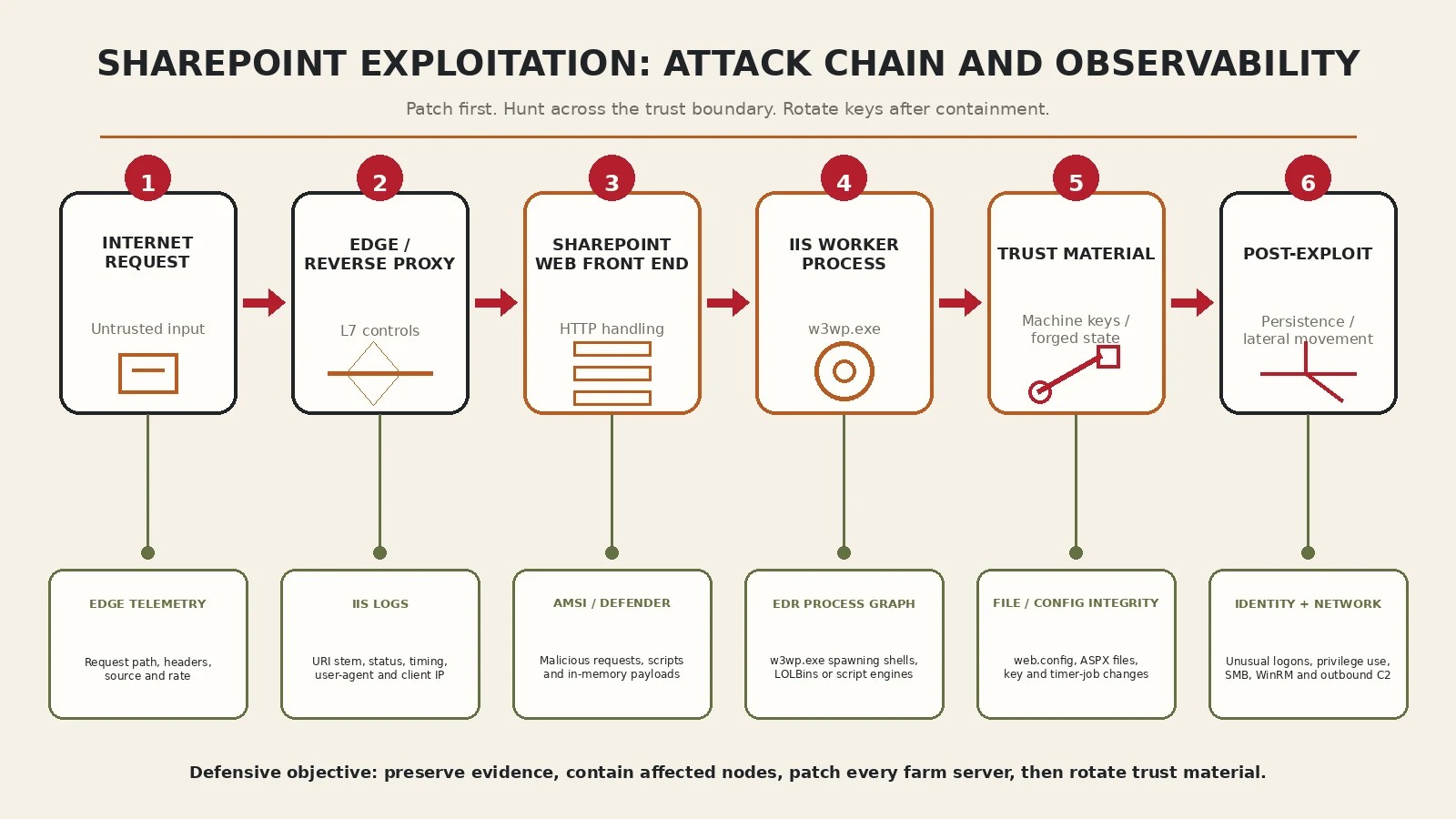
The relevant boundary is not simply “internet to server.” A request traverses an edge device, IIS, ASP.NET, SharePoint request handling, farm services, and identities with access to content and infrastructure. Each transition creates both an exploitation opportunity and a defensive observation point.
1. Exposure becomes reachability
Public DNS, TLS certificates, old bookmarks, partner integrations, and search-engine indexing can reveal endpoints that do not appear in the CMDB. An edge WAF does not eliminate the risk if it forwards the vulnerable request unchanged, trusts spoofable client-IP headers, or excludes administrative paths from inspection. The first useful control is a Layer 7 route inventory: public hostname → reverse proxy → VIP → web application → farm nodes.
2. Authentication bypass and code execution are different primitives
CVE-2026-55040 matters because authentication failures can change the principal under which SharePoint evaluates a request. Rapid7’s public disclosure says an unauthenticated attacker who knows a target identity can impersonate a SharePoint user or administrator. It does not mean that the attacker automatically becomes a Windows or domain administrator. Impact depends on the impersonated user, accessible SharePoint functions, connected services, and whether a second vulnerability turns application control into code execution.
This distinction is important for Red Teams and defenders. A scanner that proves a build is old has identified exposure; it has not demonstrated the security context, reachable business actions, or exploit-chain impact. Conversely, waiting for a weaponized public PoC before patching ignores Rapid7’s evidence that the bypass can be chained with a separate RCE. In an authorized lab, validate version and controls without reproducing an embargoed exploit.
3. The worker process is the pivot point
Once execution reaches the IIS application context, w3wp.exe becomes the critical parent process. Normal SharePoint activity is noisy, but worker processes should not routinely launch cmd.exe, PowerShell, mshta.exe, rundll32.exe, certutil.exe, or network-discovery utilities. That parent-child relationship is often more durable than an endpoint-specific exploit signature.
Microsoft’s AMSI integration guidance explains why request inspection belongs close to SharePoint: AMSI can submit incoming HTTP headers—and, on supported Subscription Edition builds, selected or all request bodies—to an AMSI-capable provider before SharePoint processes them. Since the September 2025 public updates, Microsoft treats AMSI integration as mandatory for supported SharePoint Server 2016, 2019, and Subscription Edition deployments. AMSI is defense in depth, not permission to defer servicing.
4. Machine keys turn host compromise into trusted state
ASP.NET machine keys protect view state and related trusted application data. If an attacker extracts key material, deleting a web shell and applying a patch may leave the attacker able to forge data the application accepts as authentic. That is why Microsoft and CISA include machine-key rotation in SharePoint remediation guidance.
Rotation is not a reflexive first step. Preserve evidence and contain affected nodes before replacing keys. In a load-balanced farm, all servers serving the same web application must receive synchronized keys; partial rotation can invalidate sessions and create an outage. Microsoft documents manual rotation with Set-SPMachineKey and Update-SPMachineKey, and newer builds support automatic rotation through the farm’s key-management service. Follow the vendor’s machine-key management procedure rather than editing web.config by hand.
A safe validation workflow for authorized environments
The following workflow deliberately avoids exploit reproduction. It establishes whether the farm is exposed, fully serviced, instrumented, and free of obvious post-exploitation behavior. Run SharePoint cmdlets from the SharePoint Management Shell with authorized administrative privileges.
# Farm build and node inventory
$farm = Get-SPFarm
$farm.BuildVersion

Get-SPServer |
  Select-Object Address, Role, Status |
  Sort-Object Address

# Record recently installed Windows/SharePoint hotfixes
Get-HotFix |
  Sort-Object InstalledOn -Descending |
  Select-Object -First 30 HotFixID, Description, InstalledOn
Compare the observed build and installed packages with Microsoft’s current update table for the exact product. For the July 14, 2026 release, Microsoft lists SharePoint Server Subscription Edition build 16.0.19725.20434 (KB5002882) and SharePoint Server 2019 build 16.0.10417.20175 (KB5002883 plus KB5002885). Do not infer compliance from one node. Check every web, application, search, and temporarily offline server, then confirm Central Administration reports successful product and patch installation status.
Microsoft’s software-update procedure recommends a full backup and healthy farm before update work, followed by monitoring of Central Administration and upgrade logs. A failed configuration step is not cosmetic: it can leave binaries and farm schema at different servicing states.
Hunt the process graph, not only the CVE string
In Microsoft Defender XDR, a high-signal starting query is any suspicious child process of IIS. Tune the list against known administrative extensions and backup agents; do not auto-isolate production servers solely from this query.
let SuspiciousChildren = dynamic([
  "cmd.exe", "powershell.exe", "pwsh.exe", "mshta.exe",
  "rundll32.exe", "certutil.exe", "bitsadmin.exe", "wmic.exe"
]);
DeviceProcessEvents
| where Timestamp > ago(30d)
| where InitiatingProcessFileName =~ "w3wp.exe"
| where FileName in~ (SuspiciousChildren)
| project Timestamp, DeviceName, InitiatingProcessCommandLine,
          FileName, ProcessCommandLine, AccountName, SHA256
| order by Timestamp desc
Then hunt for files written by the same worker process to web roots, temporary directories, startup locations, and SharePoint layouts. The extension list is intentionally broad: attackers can avoid .aspx, and legitimate SharePoint operations can create files. Correlate with process, request, and identity telemetry.
DeviceFileEvents
| where Timestamp > ago(30d)
| where InitiatingProcessFileName =~ "w3wp.exe"
| where FolderPath has_any (
    @"\inetpub\wwwroot\", @"\Web Server Extensions\16\TEMPLATE\LAYOUTS\",
    @"\Windows\Temp\", @"\ProgramData\Microsoft\Windows\Start Menu\Programs\StartUp\"
  )
| project Timestamp, DeviceName, ActionType, FolderPath,
          FileName, SHA256, InitiatingProcessCommandLine
| order by Timestamp desc
This is where an explicit attack-chain model outperforms isolated alerts. Map each observed event to a transition—request handling, worker execution, credential or key access, persistence, and lateral movement—using the same method described in Advanced Threat Modeling: From Static Diagrams to Attack Chains.
Detection and response matrix
A practical SharePoint exploitation detection strategy correlates evidence across layers instead of searching for one endpoint or payload. The matrix below ties each trust boundary to evidence, behavior, and an operational response.
| Layer | Evidence to preserve | High-value detections | Defensive action |
|---|---|---|---|
| Edge | Reverse-proxy/WAF logs, raw headers, TLS and route configuration | Rare SharePoint paths, malformed tokens, request bursts, bypassed proxy routes | Restrict public reachability; enforce L7 forwarding and trusted client-IP handling |
| IIS / SharePoint | IIS logs, ULS logs, configuration, deployed solutions and farm topology | Endpoint anomalies, unexpected status sequences, web-root or layouts changes | Patch every node; complete configuration; enable and validate AMSI |
| Endpoint | EDR timeline, memory where feasible, processes, files, services and tasks | w3wp.exe child processes, outbound connections, script engines and LOLBins | Contain affected nodes without erasing evidence; rebuild when integrity is uncertain |
| Trust / identity | Machine-key state, service-account logons, token activity and privilege changes | Key/config access, forged-state symptoms, unusual service-account use | Rotate keys and credentials after containment; synchronize changes farm-wide |
| Network | DNS, proxy, firewall, SMB, WinRM and east-west flow records | New outbound destinations, admin protocols from web front ends, database anomalies | Segment tiers; constrain egress; limit management paths and service identities |
Containment order matters
- Confirm scope. Enumerate every on-premises SharePoint farm, web application, alternate URL, node, service identity, and public route. Include disaster-recovery and migration systems.
- Preserve volatile and durable evidence. Export edge, IIS, ULS, EDR, identity, DNS, and firewall telemetry. Capture memory when policy, tooling, and incident severity justify it.
- Contain affected servers. Remove suspicious nodes from load-balancer rotation and restrict egress. Avoid powering off systems before deciding whether volatile evidence is required.
- Patch the complete farm. Use the exact product’s latest cumulative packages, run the SharePoint Products Configuration Wizard as required, and validate build consistency.
- Eradicate or rebuild. If arbitrary code execution is confirmed and system integrity cannot be proven, rebuilding from known-good media is stronger than deleting observed artifacts.
- Rotate trust material and credentials. Rotate SharePoint machine keys farm-wide, application-pool/service-account secrets, certificates, and any credentials exposed to the compromised security context.
- Harden and monitor. Validate AMSI and EDR coverage, reduce internet exposure, enforce segmentation and egress controls, and retain heightened monitoring.
Exposure reduction should also include the human and identity layer. Public staff records, leaked credentials, and partner relationships can help an attacker identify a privileged SharePoint user to impersonate. The workflow in Defensive Corporate OSINT provides a controlled way to measure that external identity context without turning the exercise into uncontrolled collection.
What not to do
- Do not run unverified public exploit scripts against production. For CVE-2026-55040, full technical details were still under coordinated disclosure on July 14. Build verification is sufficient to trigger remediation.
- Do not equate a blocked payload with a remediated farm. WAF and AMSI signals can buy time and provide evidence; they do not replace the vendor update.
- Do not rotate machine keys on only one load-balanced node. Unsynchronized keys can break sessions and availability.
- Do not rely only on IoCs. Paths, hashes, and infrastructure change. Parent-child behavior, trust-material access, and unexpected east-west traffic survive tool changes.
- Do not close the incident after patch deployment. Patching removes a vulnerability. It does not establish when exploitation began or what the attacker accessed.
Strategic takeaways
For Red Teams: a SharePoint assessment should measure the chain, not merely identify a version. In authorized environments, test route discovery, identity assumptions, segmentation, application-pool privileges, EDR visibility, egress restrictions, and whether defenders can correlate a suspicious request with worker-process behavior. Avoid reproducing unpublished exploit mechanics when safer control validation answers the business question.
For defenders: the durable detection unit is the trust-boundary transition. Correlate edge requests with IIS and ULS activity, w3wp.exe descendants, file/configuration changes, service-identity use, and outbound connections. No single source is sufficient.
For security leaders: SharePoint Server is not just another Windows workload. Its business content, identity integrations, and farm-wide trust material make it a concentrated risk. The control objective is a complete lifecycle: authoritative asset inventory, rapid servicing, observable request and process paths, rehearsed key rotation, and a decision rule for rebuild versus cleanup.
The July 2026 vulnerabilities will eventually disappear from scanners. The architecture that made them valuable—the convergence of public reachability, trusted application state, privileged identities, and sensitive documents—will remain. Patch the CVEs, but design detections and response around that architecture.
All validation and testing described here must be performed only on systems you own or are explicitly authorized to assess. The commands are inventory and defensive-hunting examples; they are not exploit code.
💜 Enjoyed this content? Support the blog with USDT (TRC20):
TX7obcjHQbDUXb4mGqoASEu1QFTKT2CFGG