OWAReaper and the Half-Click: When Reading Email Runs Code
The message looked forgettable: a short industry update, no attachment, no link, no request to sign in. The kind of mail a busy analyst opens, scans for three seconds, and archives.
In a vulnerable webmail session, those three seconds were enough.
On July 22, 2026, according to Proofpoint’s July 29 investigation, the Russia-aligned actor TA488 began sending messages that exploited CVE-2026-42897 in Outlook Web Access. The message body was the loader. The reading pane was the execution environment. The authenticated browser origin supplied the privileges.
The implant that followed, which Proofpoint named OWAReaper, did not need a conventional executable on disk. It operated inside OWA, manipulated Exchange-facing resources, persisted in browser and mailbox state, and used legitimate application behavior as camouflage. The campaign is a useful case study because it breaks several comfortable assumptions at once: that phishing needs a click, that endpoint telemetry will expose persistence, and that a password reset closes a browser-context intrusion.
This article reconstructs the mechanics from public reporting and turns them into a defensive hunt. It does not reproduce a weaponized exploit. Any validation should be confined to an isolated, authorized lab with synthetic mailboxes and no route to production.
The trust boundary was in the reading pane
Webmail has an awkward job. It must display hostile, internet-originated HTML inside an application that already holds a user’s authenticated mailbox session. The safe design is conceptually simple:
untrusted MIME / HTML
        ↓
parse into a controlled representation
        ↓
remove active content and dangerous attributes
        ↓
render inert markup under restrictive browser policy
The implementation is not simple. Email HTML is malformed, nested, encoded, rewritten by gateways, and interpreted differently by parsers and browsers. A sanitizer may reason about one representation while the browser executes another. That parser differential is the opening.
Microsoft describes CVE-2026-42897 as improper neutralization during page generation in on-premises Exchange OWA. The vendor assigned CVSS 8.1, confirmed exploitation, and states that a crafted email can execute arbitrary JavaScript in the browser context when opened under the required interaction conditions. Exchange Online is not affected. The affected on-premises families were Exchange Server 2016, 2019, and Subscription Edition.
The vulnerability taxonomy says XSS. The operational primitive is more useful: attacker-controlled JavaScript running on the trusted OWA origin, in a browser that already has an authenticated user. That script does not automatically become operating-system code or Exchange server RCE. It does, however, inherit access to application interfaces, DOM state, browser storage, and any authenticated operations exposed to that user.
This is why dismissing the issue as “just XSS” produces the wrong response. The same origin that renders the inbox is also the control surface for mail, contacts, folders, add-ins, and account state. Once hostile script crosses that boundary, the attacker’s next question is not “How do I drop an EXE?” It is “What durable authority can I derive from this session?”
From a bland email to OWAReaper
Proofpoint’s observed messages used low-friction subjects such as supply-chain metrics, public-health indicators, tourism, and energy updates. The absence of a link or attachment was not an oversight. It removed the cue most users and many mail controls are trained to distrust.
The reported loader used an event handler in the message body, then assembled encoded JavaScript from other parts of the HTML. Payload fragments were concealed in image-related data, including content placed after fragment markers. Opening the message caused the browser to reconstruct and execute the code. The exact exploit is less important than the sequence:
- Delivery: a legitimate-looking HTML email reaches the mailbox.
- Rendering: OWA transforms the body for the reading pane.
- Sanitizer failure: active markup survives or is reconstructed into an executable form.
- Origin inheritance: JavaScript runs inside the authenticated OWA context.
- Capability conversion: the implant turns temporary browser execution into mailbox, token, permission, and storage persistence.
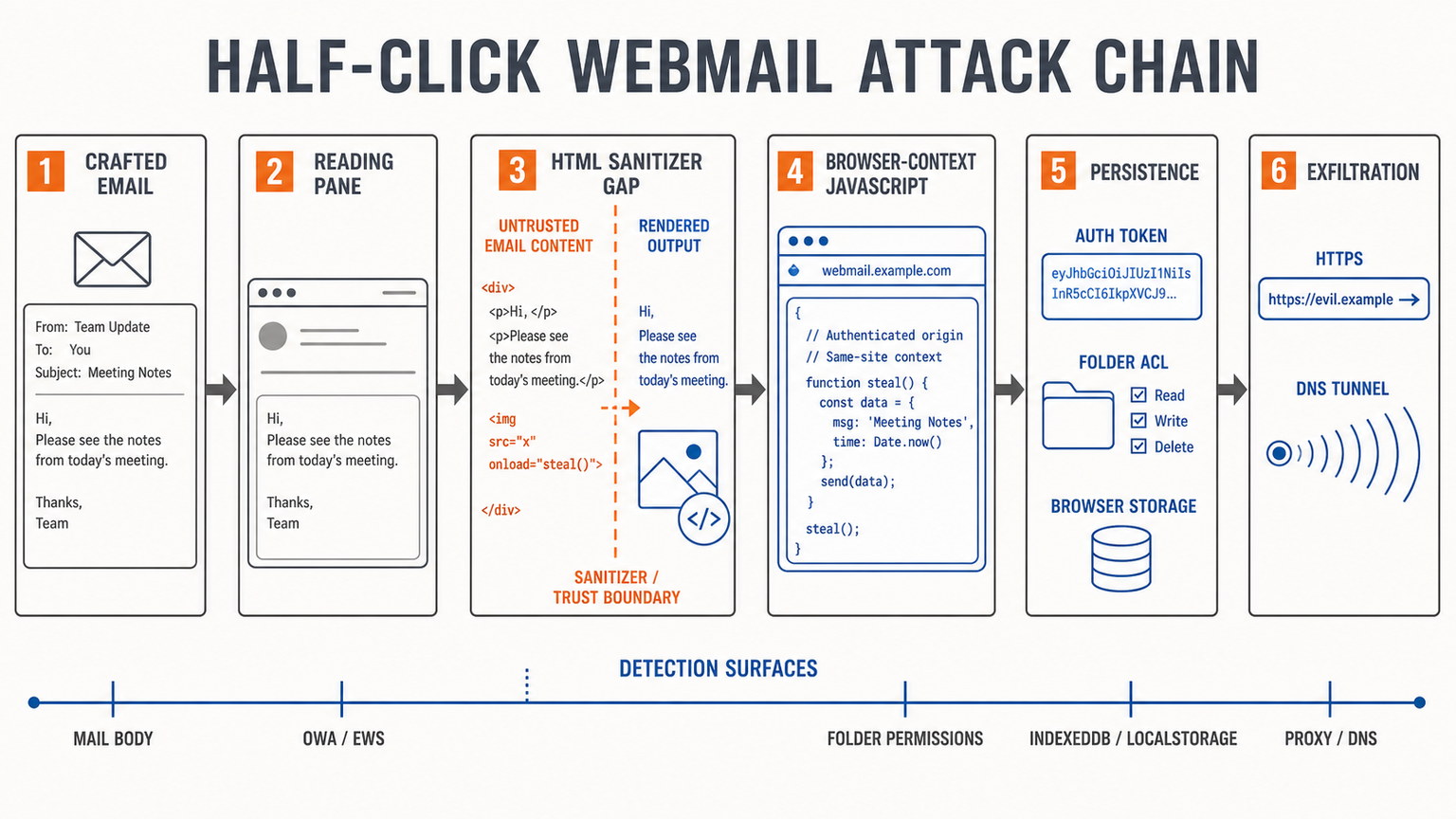
The human part of the operation is almost inverted. Traditional phishing asks the target to make a conspicuous decision: follow a link, open a document, enable content, or surrender credentials. A half-click exploit asks only for normal work. The user sees a dull message and opens it precisely because it does not look consequential.
That shift matters for security awareness. “Do not click suspicious links” remains useful, but it cannot prevent exploitation triggered by rendering. The control moves upstream to patch state and content neutralization, and downstream to browser, mailbox, EWS, proxy, and DNS telemetry.
Persistence moved above the endpoint
Proofpoint’s analysis describes OWAReaper as an evolution of the earlier ZimReaper toolset. Its persistence model is the most instructive part of the chain.
Mailbox permissions
The implant reportedly attempted to grant the Exchange Default principal Owner rights across mail folders. In Exchange semantics, Default is not shorthand for “the victim.” It represents authenticated users who do not otherwise have an explicit permission entry. A broad grant can therefore turn a single browser execution into mailbox access from other accounts.
For a targeted mailbox, defenders can begin with explicit folder checks. Folder names are localized and environments differ, so treat this as a starting point rather than a complete enterprise hunt:
# Exchange Management Shell — read-only inspection
Get-MailboxFolderPermission `
  -Identity '[email protected]:\Inbox' `
  -User Default

Get-MailboxFolderPermission `
  -Identity '[email protected]:\Sent Items' `
  -User Default
Unexpected rights such as Owner, PublishingEditor, or Reviewer deserve investigation against change records and mailbox audit data. Do not blindly delete every Default entry: calendars and intentionally shared folders often use them. Scope first, then remediate.
Add-in and token abuse
Proofpoint reports attempts to obtain Exchange Web Services access through privileged Outlook add-ins. The strategic value is clear. A browser event is transient; a reusable token can outlive the tab, the password, and sometimes the device.
Incident response should therefore inventory affected add-ins, revoke and audit EWS/OAuth material associated with them, and correlate token issuance or use with the first suspicious message view. A password reset alone is not a sufficient containment action when the adversary may have acquired alternate authentication material.
Browser-resident state
OWAReaper reportedly used OWA’s IndexedDB database owa_offline_db and the PageDataPayload.OwaUserDefaultSettings localStorage key. Proofpoint also describes poisoned offline message content and settings-based execution. These locations survive an ordinary browser restart. If the user signs in again, the browser can re-enter attacker-controlled state.
Collection should precede cleanup. On an affected workstation, preserve a browser profile copy and acquire relevant storage with an approved forensic method. For a quick, non-destructive triage in browser developer tools, an authorized responder can enumerate names without reading business content:
// Read-only triage in the affected OWA origin
Object.keys(localStorage);
await indexedDB.databases();
After evidence is secured, follow the current incident procedure to clear the affected OWA storage, invalidate sessions, and reauthenticate from a known-clean browser profile. Full device re-imaging without removing server-side permissions, tokens, or mailbox-hosted persistence can leave the attacker’s access intact.
Command and exfiltration channels
The reported implant supported two command paths: GitHub commit messages and specially structured inbound email. It also used multiple exfiltration routes, including HTTPS through relay infrastructure and DNS as a fallback. This is application-layer resilience: if one channel is blocked, another already exists inside traffic classes organizations commonly permit.
That design echoes a broader point from advanced attack-chain threat modeling: the decisive telemetry is often the sequence of trusted actions, not the presence of an obviously malicious process. OWAReaper’s behavior is suspicious because a message view is followed by permission changes, storage mutation, token activity, rare network destinations, and cleanup of the triggering content.
The Zimbra rehearsal explains the operator’s choices
The OWA campaign did not appear in isolation. On July 23, CISA and partner agencies published AA26-204A describing a Russian state-supported campaign against Zimbra Collaboration Suite. Proofpoint tracks overlapping activity as TA488; other sources use Void Blizzard, Laundry Bear, and CL-STA-1114. Those labels are not guaranteed to map perfectly, but the tradecraft overlaps.
The Zimbra vulnerability, CVE-2025-66376, was a stored XSS in the Classic UI. According to the vendor and CVE record, ZCS 10 before 10.0.18 and 10.1 before 10.1.13 were affected. Crafted CSS @import directives could bypass the intended sanitization path. Public reporting describes split markup that became executable after rewriting, including an SVG load handler that decoded a JavaScript payload.
CISA states that the campaign began while the flaw was still a zero-day and that viewing a malicious message could trigger collection of the previous 90 days of email, the Global Address List, and other sensitive data. Proofpoint’s technical account adds persistence through an app-specific password named ZimbraWeb, theft of authentication material and 2FA scratch codes, and mailbox export. Zimbra’s security advisory confirms the fixed releases.
The operator’s progression is visible. ZimReaper proved that message rendering could become an authenticated collection platform. OWAReaper reduced the obvious footprint, expanded persistence options, and targeted a different enterprise webmail stack. The product changed. The idea did not: use the browser as the implant host and the mailbox as both data source and control plane.
For offensive teams, this is a reminder that untrusted content crossing into a privileged interpreter is not unique to AI systems. Tuesday’s analysis of GitLost and confused-deputy failures in AI agents examined a tool-bearing model acting on attacker-shaped context. Here, the interpreter is a webmail renderer and the delegated authority is the user’s authenticated browser session. The shared design failure is the same: data is allowed to become instruction inside a more trusted execution context.
A defensible hunt: signals before signatures
Indicators from a single campaign age quickly. Behavioral joins are harder for the attacker to discard. Build the hunt around the transition from message view to durable authority.
1. Mail-body inspection
Preserve original MIME. Search for unusual combinations of active HTML, encoding, split markup, hidden SVG elements, event handlers, and large Base64 fragments. The following YARA rule is intentionally broad and defensive; it is suitable for triage against exported messages, not automatic deletion:
rule Suspicious_HalfClick_Webmail_HTML
{
  meta:
    purpose = "defensive triage of exported email bodies"
    limitation = "heuristic; expect false positives in complex newsletters"
  strings:
    $svg     = /<svg\b/i
    $event   = /onload\s*=/i
    $decode  = /atob\s*\(/i
    $import  = /@import\b/i
    $hidden  = /display\s*:\s*none/i
    $datauri = /data:image\/[a-z0-9.+-]+;base64,/i
  condition:
    filesize < 2MB and 4 of them
}
A detection hit is a lead, not proof. Commercial mail templates legitimately use hidden elements and data URIs. The meaningful escalation is a rare combination plus a view event, post-view mailbox changes, or outbound traffic.
2. OWA, EWS, and mailbox telemetry
- Correlate the first render of suspect messages with EWS calls, add-in activity, mailbox permission changes, and session anomalies.
- Enumerate nonstandard permissions granted to
Default, especially broad rights across many folders. - Review mailbox audit and Exchange/IIS logs for activity inconsistent with the user’s baseline. Be explicit about retention gaps; absence of a log is not proof of absence.
- Look for the exploit message being modified or stripped shortly after it is opened. Self-cleanup is part of the reported OWAReaper chain.
3. Browser state
- Acquire OWA-related IndexedDB and localStorage from affected profiles before clearing them.
- Compare suspicious keys and offline message records with a known-clean profile using the same OWA build.
- Check whether persistence returns after restart but disappears in a new, clean browser profile. That differential is valuable evidence.
4. Network and DNS
- Alert on OWA browser sessions contacting newly registered or rare domains immediately after message views.
- Hunt for long, high-entropy subdomain labels, unusual query volume, and repeated TXT/A lookups to low-prevalence domains.
- Join DNS, proxy, and browser telemetry. DNS anomalies without the mailbox sequence will generate noise; the cross-layer timeline makes them useful.
Proofpoint published campaign indicators and Emerging Threats signatures with its reports. Use them for retrospective matching, but keep behavior-based detections in place after the domains and hashes expire.
Remediation has two timelines
The first timeline is vulnerability management. For Exchange, Microsoft’s current guidance supersedes the initial emergency-only posture: install the applicable June and July 2026 Exchange security updates. The Exchange Team’s advisory, updated July 14, says the July update removes the recommendation to retain the temporary CVE-2026-42897 mitigation. Validate builds with Microsoft’s Exchange Health Checker and confirm every server in the organization, not just the internet-facing node. For Zimbra, run a supported release at or above the vendor-fixed branches and review the latest advisory because later releases contain additional mail-rendering fixes.
The second timeline is incident response. Patching stops the known rendering path; it does not revoke what an earlier execution created. Where exposure or evidence exists:
- Preserve suspect messages, browser profiles, relevant Exchange/Zimbra logs, DNS, and proxy data.
- Remove unauthorized folder permissions and app-specific passwords only after documenting them.
- Revoke sessions, EWS/OAuth tokens, add-in grants, and recovery material; rotate passwords and regenerate 2FA scratch codes.
- Clear confirmed malicious OWA browser storage and offline caches after acquisition.
- Assess the mailbox as a data breach: determine what mail, directory data, attachments, and recovery secrets were accessible.
- Search for follow-on messages sent from compromised accounts and notify downstream recipients where necessary.
This distinction also appears in SharePoint exploitation response: a fixed version answers “Can this path still be exploited?” It does not answer “Was durable access already established?”
Strategic takeaways
Rendering is execution-sensitive infrastructure. Mail security programs often invest heavily in URLs and attachments while treating the HTML reading pane as presentation. It is a parser boundary operating inside an authenticated application and should be threat-modeled accordingly.
The endpoint is no longer the only persistence ledger. Mailbox permissions, app tokens, server-hosted messages, IndexedDB, localStorage, and add-in state can preserve access without a durable process on disk. Re-imaging a laptop may improve the attacker’s operational security by destroying local evidence while leaving server-side authority untouched.
User training cannot compensate for renderer flaws. The victim in a half-click chain performs a normal task. Prevention depends on supported builds, robust sanitization, browser policy, exposure management, and telemetry that joins mail, identity, application, browser, and network events.
Hunt the authority conversion. The most durable analytic is not a subject line or C2 domain. It is the short interval in which an ordinary message view becomes a permission grant, token, browser-state mutation, mailbox rewrite, or unusual data channel.
The quiet detail in this campaign was not the exploit string. It was the attacker’s choice to make the email boring. The message did not need to persuade the recipient to take a risk. It only needed the webmail client to mistake hostile data for trusted application behavior.
💜 Enjoyed this content? Support the blog with USDT (TRC20):
TX7obcjHQbDUXb4mGqoASEu1QFTKT2CFGG