Defensive WAF Validation Checklist for AppSec and Blue Teams
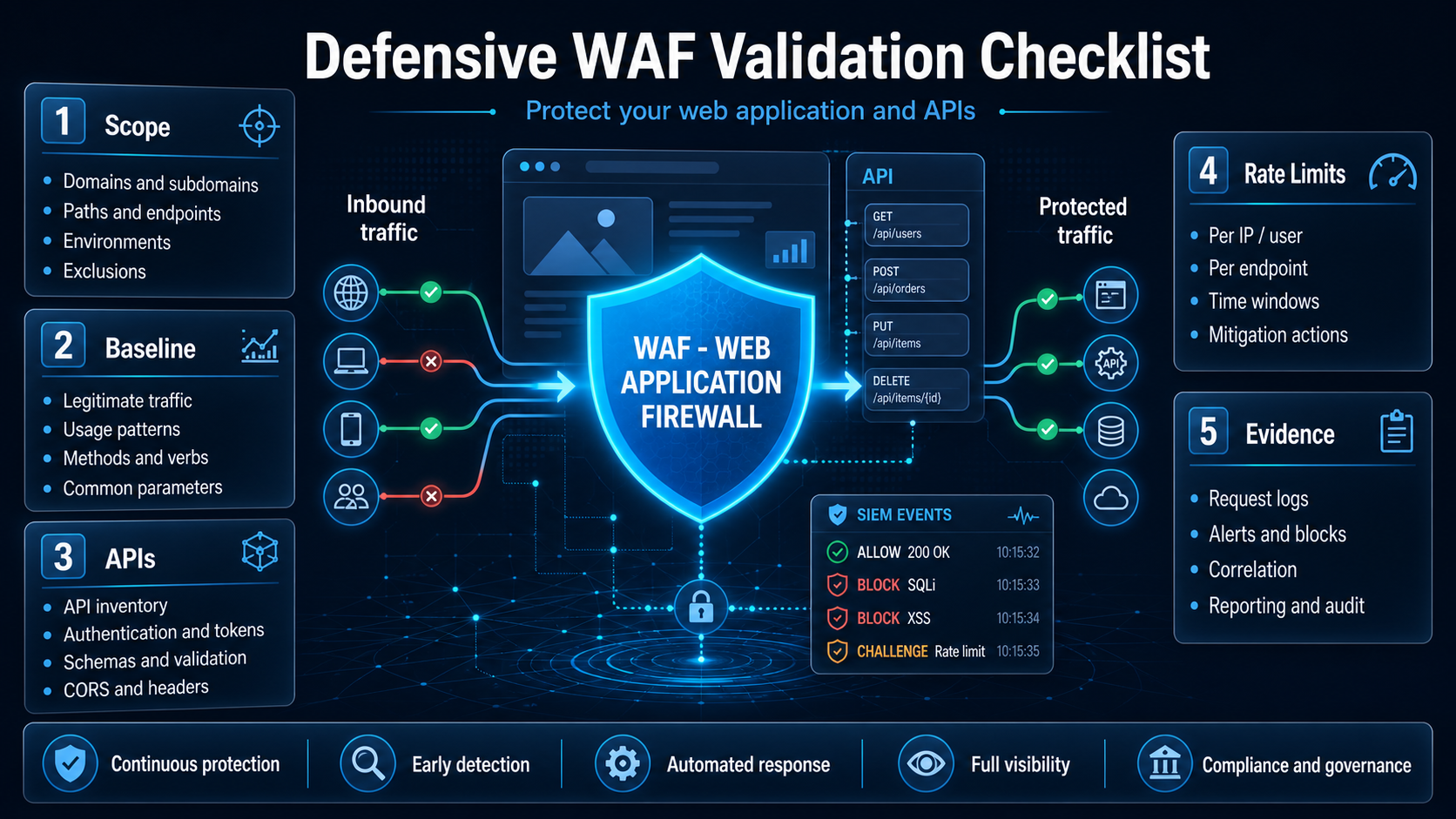
Defensive WAF Validation Checklist: a practical guide to validate coverage, detection, evidence, and mitigation without turning validation into aggressive exploitation.
Introduction
A WAF should not be treated as a magic box that blocks everything. It must be validated with defined scope, evidence, and clear defensive criteria.
This checklist helps AppSec, Blue Team, and authorized offensive security teams assess whether a Web Application Firewall is protecting the right flows, generating useful signals, and supporting risk reduction without breaking the application.
Use only on systems you own or are explicitly authorized to test. The goal is defensive validation, detection improvement, and hardening.
How to use this checklist
Use this material as a validation guide before, during, and after authorized testing on applications protected by a WAF. For each item, record evidence, the event in the WAF/SIEM, the observed impact, and the recommended action.
The goal is not to prove that every WAF can be bypassed, but to measure whether the layer is covering the right flows, generating useful telemetry, and reducing risk without blocking legitimate users.
1. Scope and authorization
- [ ] Authorized domains and applications defined.
- [ ] Environments separated: production, QA, staging, and lab.
- [ ] Testing windows approved.
- [ ] Emergency contacts defined.
- [ ] Allowed test types documented.
- [ ] Rate and volume limits defined.
- [ ] Critical exclusions mapped: payments, real login, sensitive administrative areas.
Minimum evidence:
Scope:
Environment:
Date/window:
Technical owner:
Approved limits:
2. Baseline before testing
- [ ] WAF version/policy recorded.
- [ ] Current mode identified: monitoring, blocking, challenge, rate limit, or allowlist.
- [ ] Log integrations verified: SIEM, dashboard, alerts, tickets.
- [ ] Critical applications mapped.
- [ ] Custom rules documented.
- [ ] Temporary exceptions reviewed.
Useful questions:
- Is the WAF seeing the real client IP?
- Are headers such as
X-Forwarded-Forhandled correctly? - Is there a difference between authenticated and unauthenticated traffic?
- Does the WAF cover APIs in addition to HTML pages?
3. Surface coverage
Validate whether the WAF covers:
- [ ] Public routes.
- [ ] Login and authentication.
- [ ] REST/GraphQL APIs.
- [ ] File uploads.
- [ ] Administrative panels.
- [ ] Forgotten subdomains.
- [ ] Legacy environments.
- [ ] Mobile/back-office endpoints.
Expected output:
Application | Host | Protected by the WAF? | Mode | Notes4. Safe detection validation
Instead of focusing on aggressive payloads, validate behavior categories:
- [ ] SQL injection — controlled generic signals.
- [ ] XSS — synthetic input in an authorized environment.
- [ ] Path traversal — harmless attempt on a lab route.
- [ ] Command injection — safe indicators only, with no real execution.
- [ ] Suspicious upload — test files with no malicious code.
- [ ] HTTP method abuse — unexpected methods.
- [ ] User-Agent and header anomalies.
- [ ] Low-volume automated requests.
For each test, record:
Category:
Endpoint:
Test input:
Application response:
WAF action: allow / log / challenge / block
Event ID in the WAF/SIEM:
False positive? Yes/No
Notes:
5. APIs and authentication
- [ ] WAF inspects JSON correctly.
- [ ] WAF understands the content types used by the API.
- [ ] Invalid or missing tokens are handled by the application and logged.
- [ ] Repeated attempts receive appropriate rate limiting.
- [ ] Sensitive endpoints have specific rules.
- [ ] 4xx/5xx errors are monitored by endpoint.
- [ ] The WAF does not replace server-side authorization controls.
Important point:
A WAF does not fix BOLA/IDOR. It can help with detection, but authorization must be enforced in the application.
6. Rate limiting and controlled abuse
- [ ] Per-IP limits defined.
- [ ] Per-account/token limits evaluated.
- [ ] Per-sensitive-route limits configured.
- [ ]
429response validated where applicable. - [ ]
Retry-Afterheaders or equivalents evaluated. - [ ] Abuse alerts reach the correct team.
- [ ] Tests stop automatically in case of instability.
Safe criterion:
Maximum approved rate:
Maximum duration:
Stop condition:
Monitoring owner:
7. False positives and user experience
- [ ] Legitimate flows tested after rule activation.
- [ ] Real user uploads are not blocked improperly.
- [ ] Search, filters, and forms continue working.
- [ ] Mobile users are not affected by aggressive fingerprinting.
- [ ] Exceptions are specific, temporary, and traceable.
Record format:
Legitimate flow affected:
Rule involved:
Impact:
Applied fix:
Exception validity:
8. Evidence and reporting
Each finding must include:
- [ ] Clear title.
- [ ] Risk category.
- [ ] Affected endpoint/host.
- [ ] Reproducible evidence.
- [ ] Corresponding event in the WAF/SIEM.
- [ ] Defensive impact.
- [ ] Objective recommendation.
- [ ] Owner and deadline.
Template:
Finding:
Host/endpoint:
Category:
Evidence:
WAF/SIEM event:
Impact:
Recommendation:
Priority:
Owner:
Deadline:
9. Post-validation
- [ ] Rules adjusted.
- [ ] Alerts tested.
- [ ] Dashboards updated.
- [ ] Exceptions reviewed.
- [ ] Response team informed.
- [ ] Retest scheduled.
- [ ] Lessons learned documented.
FAQ
Does a WAF replace fixing vulnerabilities in the application?
No. A WAF helps with mitigation, detection, and partial blocking, but it does not replace input validation, authentication, authorization, and fixing the code.
Can this checklist be used in production?
Yes, as long as there is formal authorization, an approved testing window, defined rate limits, and active monitoring to stop testing if instability occurs.
Does a WAF protect APIs against BOLA and IDOR?
Not completely. A WAF can generate signals and reduce abuse, but BOLA and IDOR require correct server-side authorization on every accessed resource.
Technical references
Download / usage
You can copy this checklist into your ticketing tool, risk spreadsheet, or internal report template.
Short version to copy:
1. Define scope and authorization.
2. Record the WAF baseline.
3. Confirm application and API coverage.
4. Validate detection by category, not by aggressive exploitation.
5. Correlate each test with an event in the WAF/SIEM.
6. Evaluate rate limiting and false positives.
7. Document evidence, recommendations, and owners.
8. Retest after adjustments.
Related reference
Also read:
💜 Enjoyed this content? Support the blog with USDT (TRC20):
TX7obcjHQbDUXb4mGqoASEu1QFTKT2CFGG